119 – SOC169 Exercise on LetsDefend
IDOR attacks happen when an application directly uses a user supplied input to access data. Without authorization, that same parameter can be manipulated to access data that should not be available to the current user. IDOR is synonymous with BOLA or Broken Object Level Authorization.
If a user is logged into a web app and the URL is displayed as:
https://example.com/profile?user_id=12345If proper authorization is not checked, a user may be able to change the user_id parameter to an arbitrary value. This may be another user (user_id=12344), or possibly admin (user_id=1)?
These Direct Object References can refer to any object within the web app such as users, order identifiers, document numbers, etc., and without proper authorization, can give access to unintended users.
This vulnerability is dangerous because it can lead to mass data exposure, account takeover, or full compromise of the server. It is also easily automated with a tool like Burp or handwritten scripts.
The following is a walk-through for detecting an IDOR attack from the letsdefend.io platform.
Alert Ownership and Case Creation
In the MAIN CHANNEL tab of the practice SIEM you will first assign the alert to yourself by clicking the ‘Take Ownership’ Action button.

Next, move to the INVESTIGATION CHANNEL tab and expand the alert and gather information.
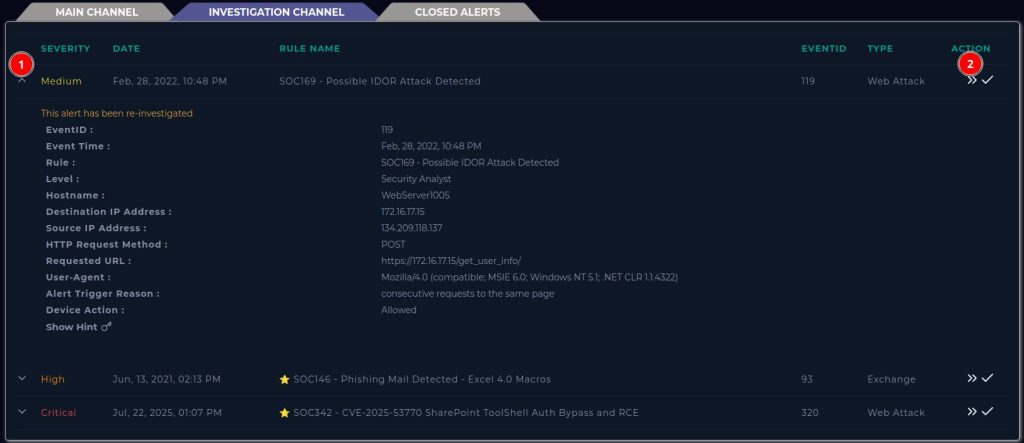
Here we see info such as the Date & Time, Hostname, Destination IP, Source IP, and the URL requested.
Click the “Create Case” Action to begin working on the case.
Playbook
Clicking “Start Playbook” details what information the SOC Analyst should be investigating and this is where you will answer questions and write case notes to close the investigation. You can close this and come back to answer questions after your investigation.
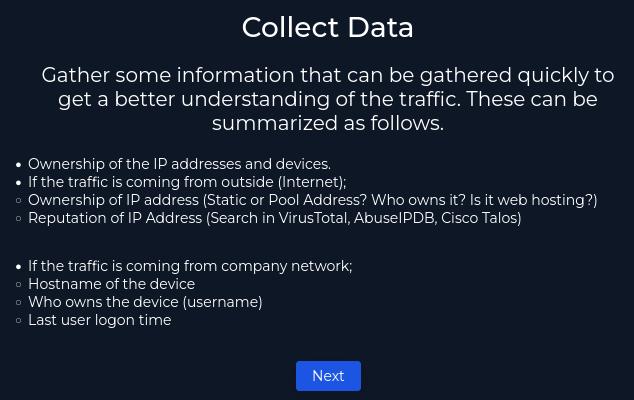
IP Ownership
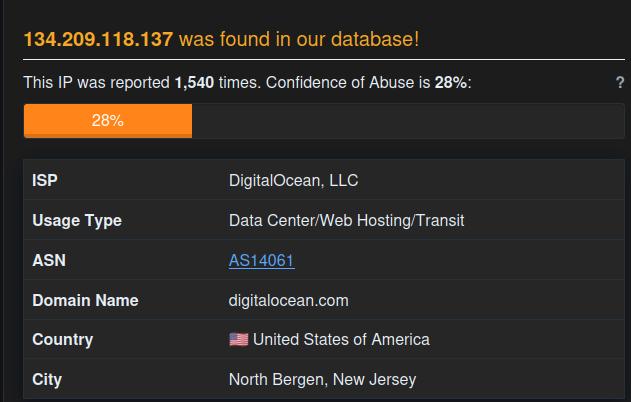
AbuseIPDB can be used to query IP addresses to find reputational data. Querying the source IP address reveals an IP address from DigitalOcean, LLC that has been reported in multiple malicious events. https://www.abuseipdb.com
Cisco Talos rates the Sender IP Reputation as Poor.
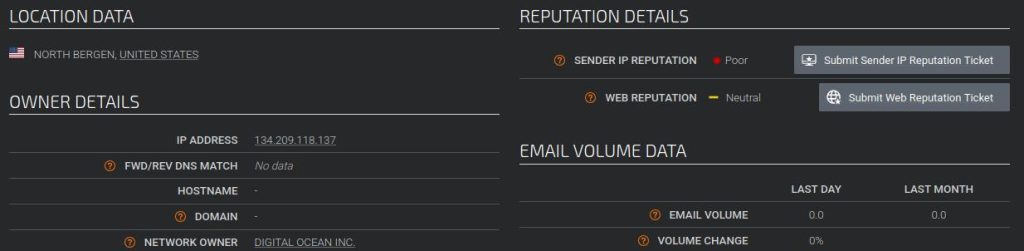
This is an external IP address with a Poor reputation. Traffic is coming from the Internet from an address pool.
Log Investigation
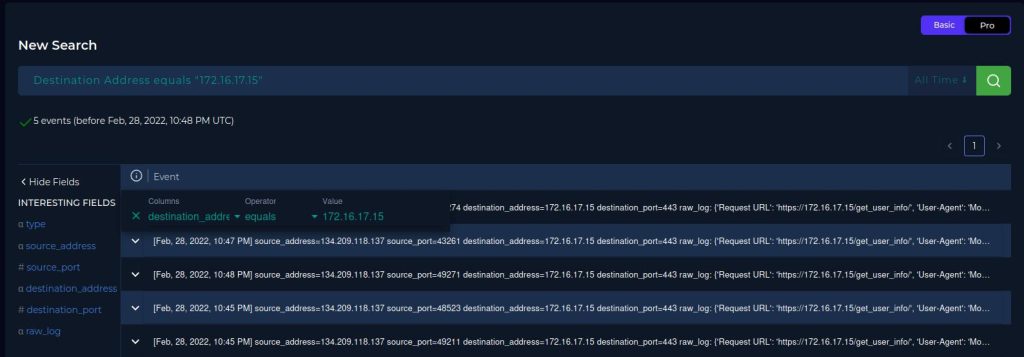
Let’s look at the logs generated that fired this alert to validate it. Go to Log Management and click the search bar to filter for logs with the destination of the attacked machine. “Destination Address equals 172.16.17.15”
There are 5 events listed all coming from the same source_address IP.
When the log is expanded, we see the source IP, destination IP, and the URL request and the POST parameters supplied in the URL. The HTTP Response Status and HTTP Response Size are also important here. A Response Status of 4XX or 5XX indicates an unsuccessful attempt and the requested data was not returned to the user/attacker. Status 200 messages indicate a successful request, 3XX may be successfully redirected requests.
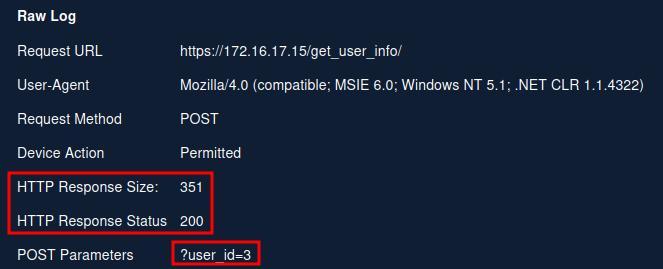
Just because the request was successful does not mean that information was leaked. You must also look at the HTTP Response Size. If the Response Status were all 200 OK messages, but the response sizes are all identical, it is more likely that all requests have successfully reached an “Invalid Request” page. If the Response Sizes are unique, the data returned from the request are unique, which indicates a successful leak of information.
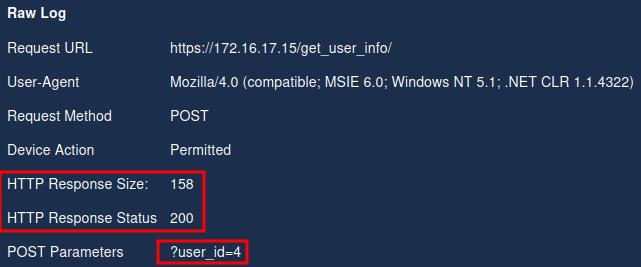
All 5 log entries have HTTP Response Status 200, as well as unique HTTP Response Sizes indicating a successful attack has been performed.
If we filter the logs for the source_ip of the attacking machine, we see that there are only the same 5 entries, so no additional machines have been attacked by this IP address.
Email Security
Searching hostname, username, and IP address does not reveal anything about having a planned security test scheduled at this time.
Endpoint Containment
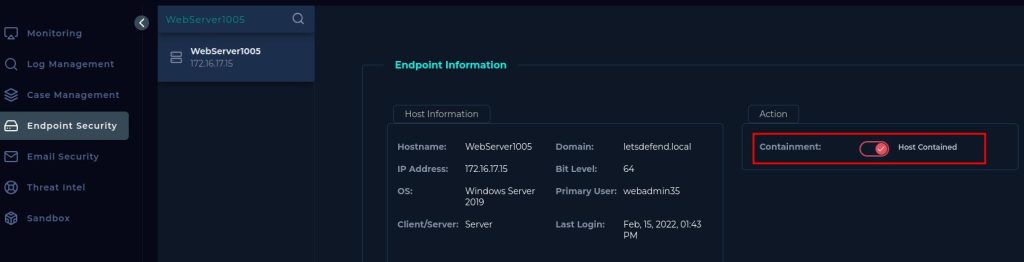
Go to Endpoint Security and search for the WebServer1005 machine. Since the machine is known to be compromised, request host containment to limit additional compromise.
Answering Playbook
The traffic is malicious, it is confirmed to have successfully performed and IDOR attack.
Type of Attack is IDOR.
This is NOT a Planned Test.
Traffic is from Internet → Company Network
We verified that the attack was indeed Successful.
Add Artifacts the the case (Source IP, Destination IP, URL request):
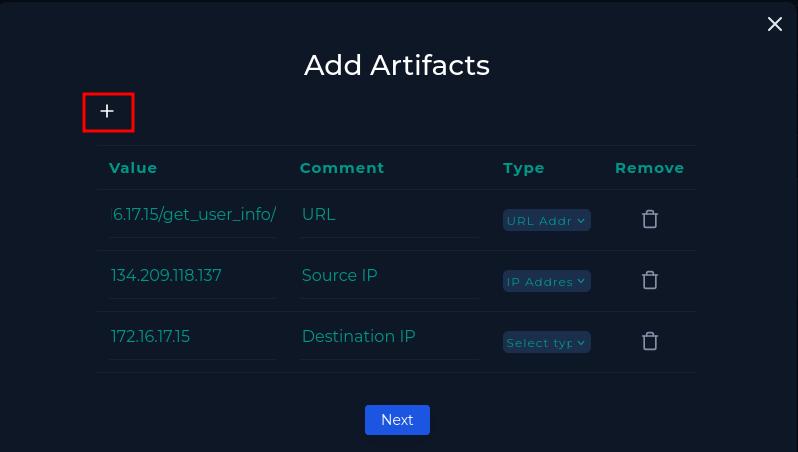
Since the attack was successful, escalate the case to Tier 2 support.
Analyst Note
An alert for a possible IDOR attack was triggered for WebServer1005 at IP address 172.16.17.15.  A successful IDOR attack was confirmed via webserver logs to the URL https://172.16.17.15/get_user_info/ by supplying arbitrary user_id parameters.   Request Response was 200 with unique Response Size.
The attacker is external from a DigitalOcean address with poor reputation.  134.209.118.137.
The machine was isolated and escalated to Tier 2.
Click Finish Playbook to finish the analysis.
Close the alert to finish the investigation.

Write an Analyst note and close the investigation:
On the Log Management page, we filter by source IP address and detect all requests.
When the requests were examined, it was determined that the attacker wanted to change the ID value and access information belonging to different users.
When the request sizes are examined, there is a different response size for each user and the status code is 200. For this reason, the attack is considered to have been successful.
Since the attack may have been successful, the device should be contained and escalated to Tier 2.
Clicking on the Results will reveal how you have been scored according how you answered the Playbook.
I’ve been using LetsDefend for about a week now, and feel like it is exactly what I have been missing in my education. I have completed a B.S. Cyber Security / Information Assurance from WGU and did not feel comfortable that my skills were directly applicable to a SOC Analyst role as far as day-to-day tasks. Practicing with LetsDefend’s SIEM alerts has provided me the hands-on practice that I was looking for.